
About JAC website multilingualization
The JAC website uses AI automatic translation (machine translation). Because it is machine translation, the translation may not always be accurate.
About the automatic translation (machine translation) function
- The website is automatically translated (machine translated) according to the language settings of the device you are using to view the website.
- To change the language, open the language selection panel from the Language button in the header and select the language.
- Some proper nouns may not be translated correctly.
- Some pages are not automatically translated. PDFs are not translated.
- Links to external sites will not be translated.
Note
- Please enable JavaScript when using this function.
- This function may not be available in some browsers or viewing environments.



We provide multilingual content through machine translation. Translation accuracy is not 100%. About the multilingualization of the JAC website
If you choose "Plain Japanese", it will be a simple sentence and a phonetic.
If you select "Attach hiragana", you will add furigana to your sentence.
You can select your native language in "Language" to translate it.
I don't understand... I'm in trouble... If that happens, please contact us.
- First, check out the Q&A!Concerns about living in Japan
Work worries Q&A - Free consultation with JAC *Only within Japan
 Weekdays 9:00-17:30 Closed on weekends and holidays
 - FITS (Foundation for International Transfer of Skills and Knowledge in Construction) is available to answer your enquiries in your native language via telephone, fax or email.

-
We provide multilingual content through machine translation. Translation accuracy is not 100%. About the multilingualization of the JAC website
If you choose "Plain Japanese", it will be a simple sentence and a phonetic.
If you select "Attach hiragana", you will add furigana to your sentence.
You can select your native language in "Language" to translate it.
Those taking the exam outside of Japan
★A blog for foreigners working in Japan★



Those taking the exam outside of Japan
Participate in the "Japanese Language Course Taught from Your Home Country"
You can participate in "Japanese Language Courses Taught by People from Your Home Country (Japanese Language Courses from [Country/Region])" through the "JAC Members" app.
If you haven't applied yet, please check the link below.
Apply for a Japanese language course
Step 1.
Attend an event
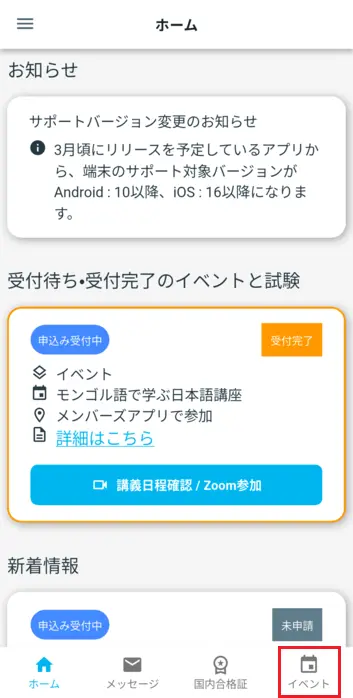
1-1. Open the "Event List" screen
On the home screen of the JAC Members app, tap [Events] on the bottom menu bar.
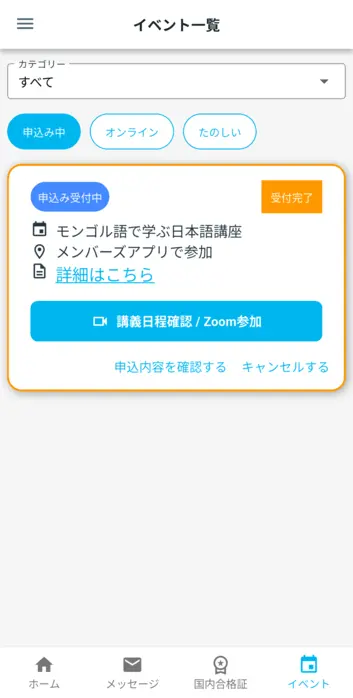
The "Event List" screen will open.
1-2. Open the "Lecture List" screen
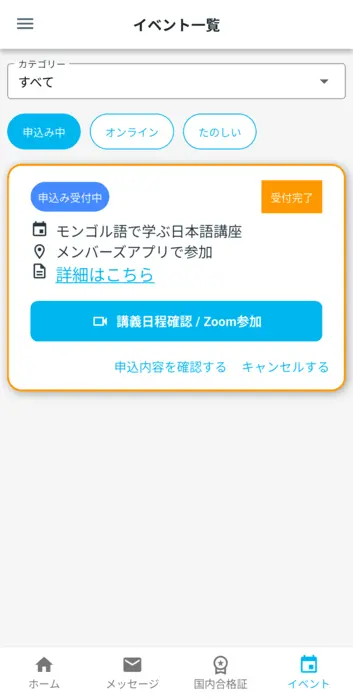
Events that have been approved by the JAC will have a "Registered" label displayed in the top right corner of the event.
For "Japanese Language Courses Taught by a Native Speaker," the "[Check Lecture Schedule / Join via Zoom]" button will also be displayed.
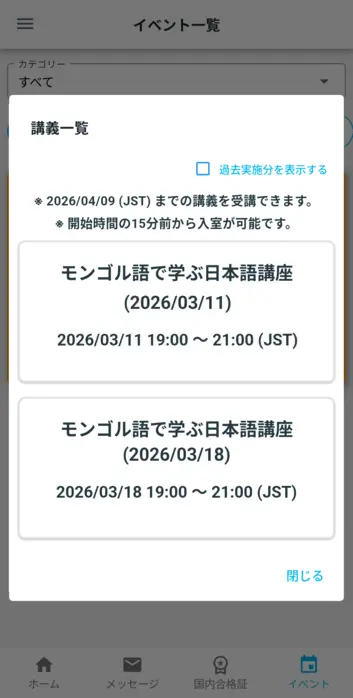
Tapping this [Check lecture schedule / Join Zoom] button will open the "Lecture list" screen.
1-3. Attend lectures
How to participate on the day
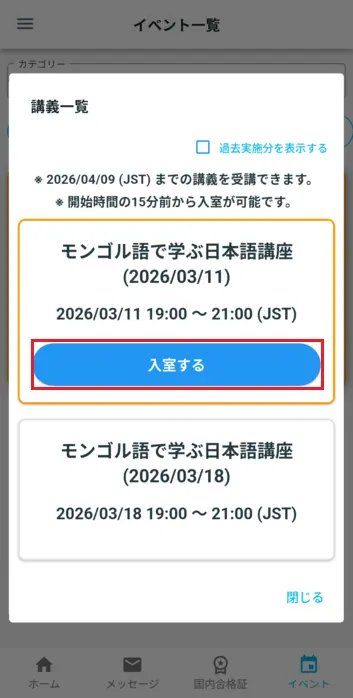
The [Enter the classroom] button will appear on the day of the lecture.
You can enter the room 15 minutes before the start time.
To join a lecture, tap the [Enter] button for the lecture you wish to attend.
The "Lecture" screen will open.
If you cannot enter the room due to an error
If you tap the "Enter Room" button when it's time for the lecture and see the message "You can enter the room from 15 minutes before the start time," please try the following steps.
① Please close the "Lecture List" screen.
② Please open the "Lecture List" screen again.
How to end a lecture
When the lecture ends, the "Lecture" screen will close automatically.
If you want to leave the lecture before it ends, tap the [Exit] button on the "Lecture" screen.
Frequently Asked Questions (FAQ)
- I want to install the "JAC Members" app. Where can I get it?
- I forgot the password I registered for "JAC Members."
- I got a new smartphone. Can I use it as is?
- How do I send a message to JAC using the "JAC Members" app?
- I don't have a passport. I changed my smartphone, so can I apply for a change of device?
- How do I delete my account?
- How can I get a pass certificate for exams taken outside Japan?
- How can I get a pass certificate for an exam I took in Japan?
- A "Supported version change notification" dialog box appears on the app screen. What should I do?
- What should I do if I don't know where the files I downloaded using the "JAC Members" app are saved?
- What should I do if I don't know where the files I downloaded from "My Page" are saved?
- What should I do if I am unable to submit an application and a dialog box appears stating "You cannot submit a new application because you have already applied for the following."?
Index
Account registration and basic operations
The Specified Skills Evaluation Exam Related